
August 2026 Release notes
Flows updates
Node comments
Add inline comments to individual nodes to document complex logic — shown as a small tooltip icon so notes stay out of the way until needed.
Version history
Every saved change to a flow is now tracked automatically. Browse previous versions, compare them to the current build, and restore an earlier state in one click.
Flow duplication
Duplicate any flow directly from the flows list. The copy includes all original nodes, connections, and configuration — a ready-made starting point instead of rebuilding from scratch.
Multi-node delete
Select multiple nodes on the canvas and delete them all at once, instead of removing them one by one.
Check out Flows docs here.
Pinboards updates
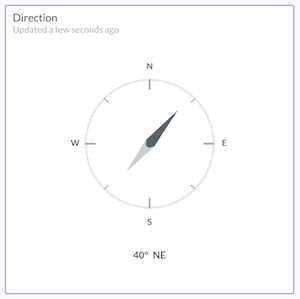
Direction widget
A new widget is available for pinboards to display directional data, often used in asset tracking cases.
Shared device indicator (Data Source)
In the Data Source panel, you can now see which devices are shared, making it easier to tell shared devices apart from your own.
Devices updates
Create device using Device Type slug
You can now create a device by entering its device type slug directly (e.g. elsys/ers-desk), without needing a Device Catalog tile. This lets private space owners, partners, developers, and testers to work with custom, unsupported, or pre-release device types before a catalog tile exists.
Location history improvements
In Location history application and pinboard widget you can now clearly see where did the trip start and where the object has last been seen.